Architects · Tutorial
Salesforce CI/CD with Azure DevOps: From Your First Branch to Production
Build a reproducible Salesforce delivery flow with Azure Repos, pull-request validation, JWT authentication, delta deployments and separate DEV, UAT and PROD targets.

A Salesforce deployment should be repeatable, reviewable and safe to run more than once. This tutorial builds that workflow from the ground up: a developer works on a feature branch, Azure DevOps validates the pull request against the target org, the merge creates a delta, and the exact delta that was revalidated is deployed.
dev, uat and main map to DEV, UAT and PROD Salesforce orgs. Pull requests only validate with --dry-run; a merge revalidates and then deploys. No password or private key is committed to Git.1. Understand the demo before copying it
In a real Salesforce program, PROD is the production org and DEV/UAT are sandboxes created from it. This demo intentionally uses three Developer Edition orgs instead, one per environment, so the whole process can be reproduced without touching a real customer org. The deployment pattern is the same; only the org topology is simulated.
| Git branch | Salesforce target | Purpose | What the pipeline does |
|---|---|---|---|
dev | DEV org | Integration of completed feature work | PR validation, then revalidate and deploy after merge |
uat | UAT org | Business or QA acceptance | PR validation, then revalidate and deploy after merge |
main | PROD org | Production baseline | PR validation, then revalidate and deploy after merge |
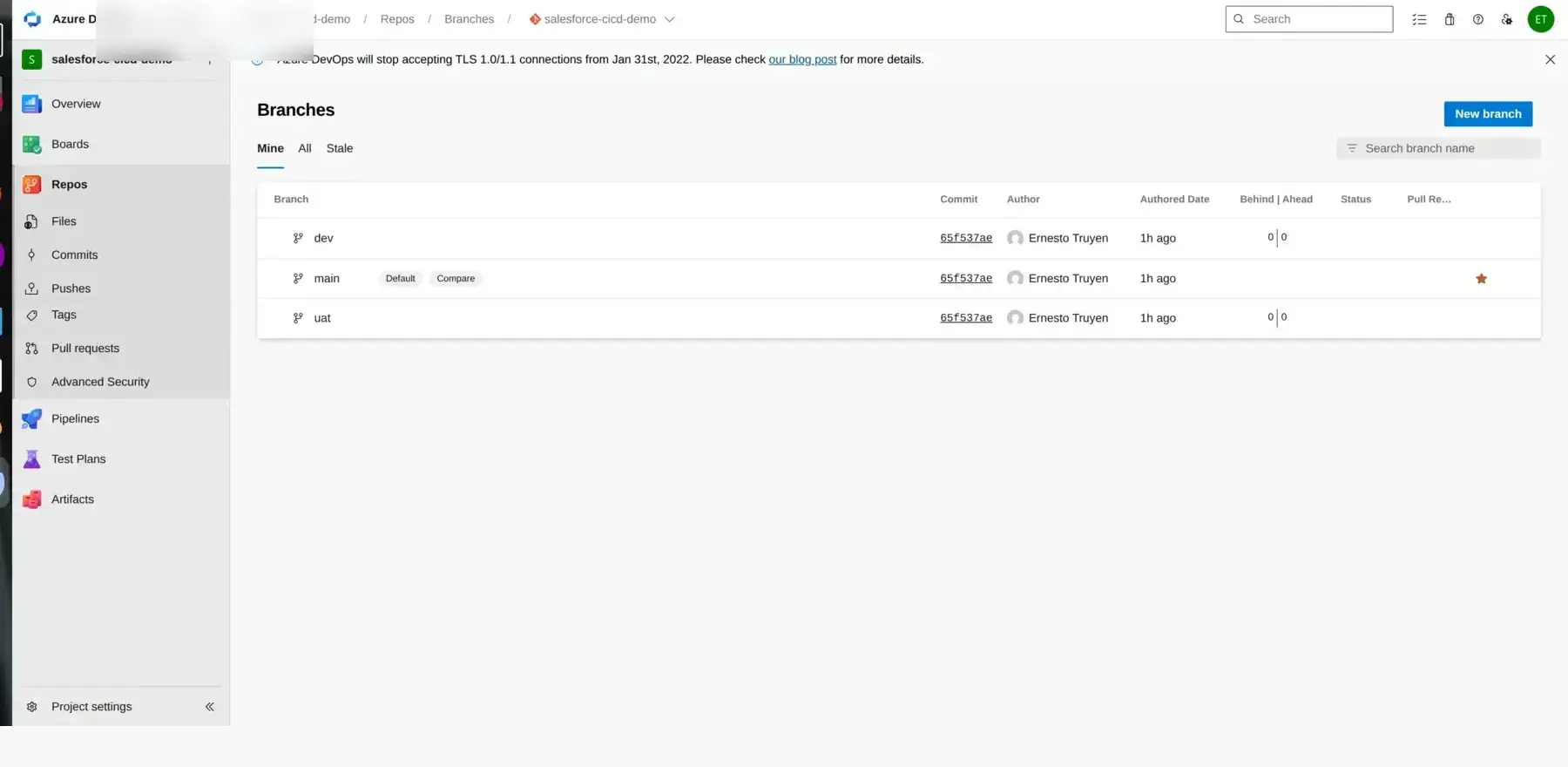
The important rule is simple: do not deploy directly from a feature branch. A feature branch is for development; the target branch determines both the review policy and the Salesforce org that receives the change.
2. Prerequisites
You need an Azure DevOps organization with Azure Repos and Pipelines enabled, three Salesforce orgs, Salesforce CLI installed locally, Git, Node.js, and OpenSSL. The pipeline installs Salesforce CLI on its own Linux agent, but installing it locally lets you create and test metadata before opening a pull request.
Create the Salesforce DX project and release branches
Start with a normal Salesforce DX project. Commit the project descriptor and source folders; never commit authenticated org files, private keys, access tokens or local configuration.
sf project generate --name salesforce-cicd-demo
cd salesforce-cicd-demo

git init
git add .
git commit -m "Initialize Salesforce DX project"

git branch -M main
git checkout -b dev
git checkout -b uat
git checkout main
git remote add origin https://dev.azure.com/ORGANIZATION/PROJECT/_git/salesforce-cicd-demo
git push --set-upstream origin main
git push --set-upstream origin dev
git push --set-upstream origin uat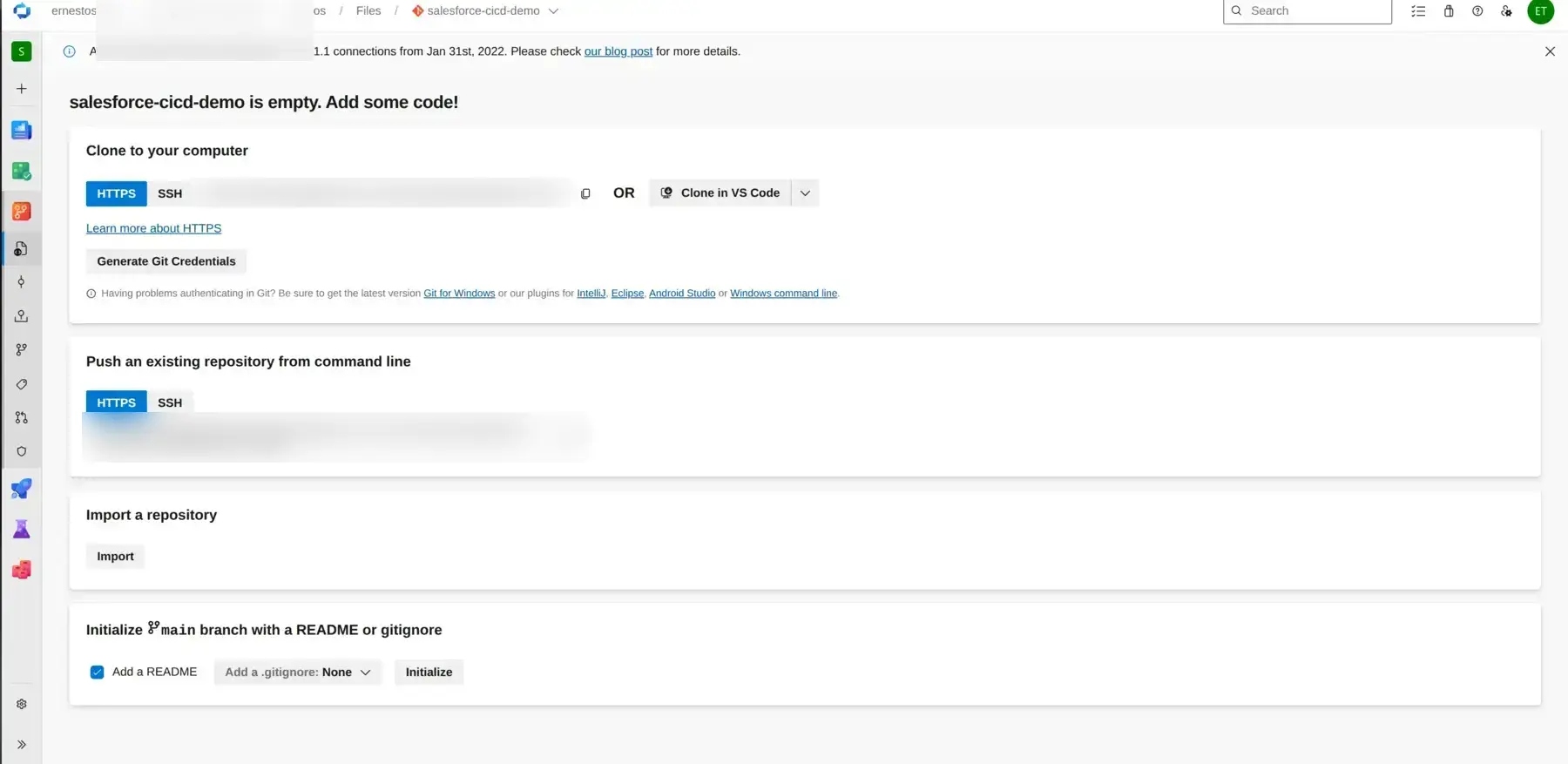
3. Create the deployment profile first
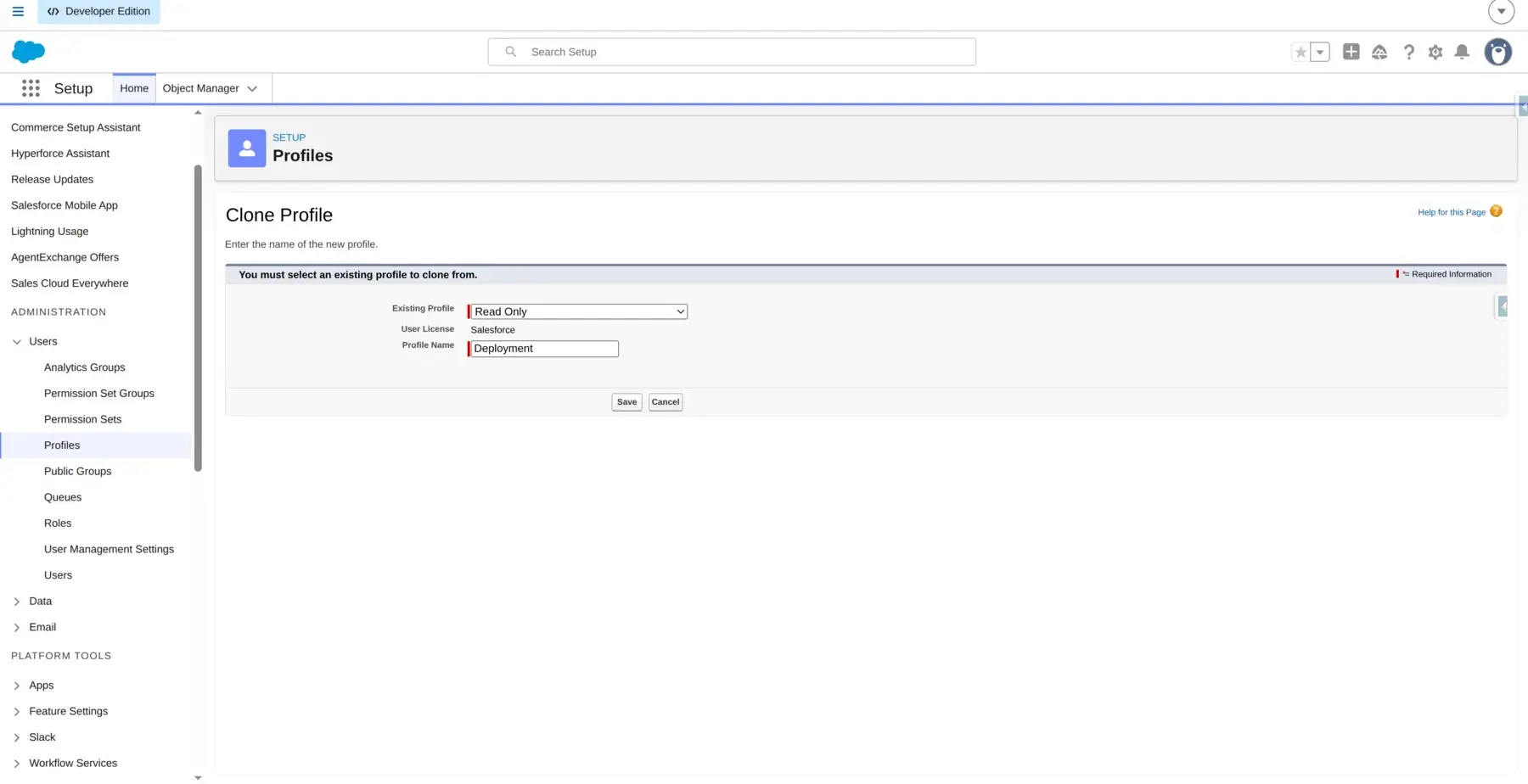
Create the permission model before creating the technical user. In this demo I cloned a base profile and named it Deployment. In a production org, prefer a minimally privileged integration profile plus permission sets; the key point is that the profile must exist before you assign it to the automation user.
- Open Setup → Profiles and select a base profile that is appropriate for your org.
- Click Clone, name the result
Deployment, and save it. - Grant only the metadata deployment, Apex test and object permissions that the project actually requires. Add more permissions only when a pipeline error identifies a justified need.
- Repeat the profile or permission-set design in DEV, UAT and PROD so the delivery identity behaves consistently.
4. Create one deployment user per Salesforce environment
Each target org needs an account used only by Azure DevOps. Do not use a developer's personal user. In this demo, usernames use .dev, .uat and .prod suffixes to make the destination unmistakable.
- In each org open Setup → Users → New User.
- Choose the Salesforce license required by your profile and select the
Deploymentprofile created in the previous step. - Use a dedicated mailbox or alias, for example
deployment@your-company.example. Salesforce usernames must be globally unique, so use a unique suffix for each environment. - Record only three values for the pipeline: the username, the org's My Domain URL, and later the Consumer Key of that same org's External Client App.
5. Generate the certificate pair
The pipeline signs in with the Salesforce CLI JWT flow. Azure DevOps will hold the private key as a Secure File; Salesforce will receive the matching public certificate in an External Client App. Run the following once per environment, changing dev to uat or prod.
mkdir -p auths/dev
chmod 700 auths/dev

openssl genpkey \
  -algorithm RSA \
  -pkeyopt rsa_keygen_bits:2048 \
  -out auths/dev/salesforce-dev.key

openssl req \
  -new \
  -x509 \
  -sha256 \
  -key auths/dev/salesforce-dev.key \
  -out auths/dev/salesforce-dev.crt \
  -days 730 \
  -subj "/CN=Azure DevOps Salesforce DEV"

chmod 600 auths/dev/salesforce-dev.key
chmod 644 auths/dev/salesforce-dev.crt

# Confirm that both files exist before continuing.
ls -l auths/dev
The .key is private and must never be committed, shared or uploaded to Salesforce. The .crt is public and is the file uploaded to Salesforce. Put auths/ in .gitignore before the first commit.
6. Create and configure the External Client App
Do this separately in DEV, UAT and PROD. The External Client App defines which certificate Salesforce trusts and which deployment user Azure DevOps can impersonate.
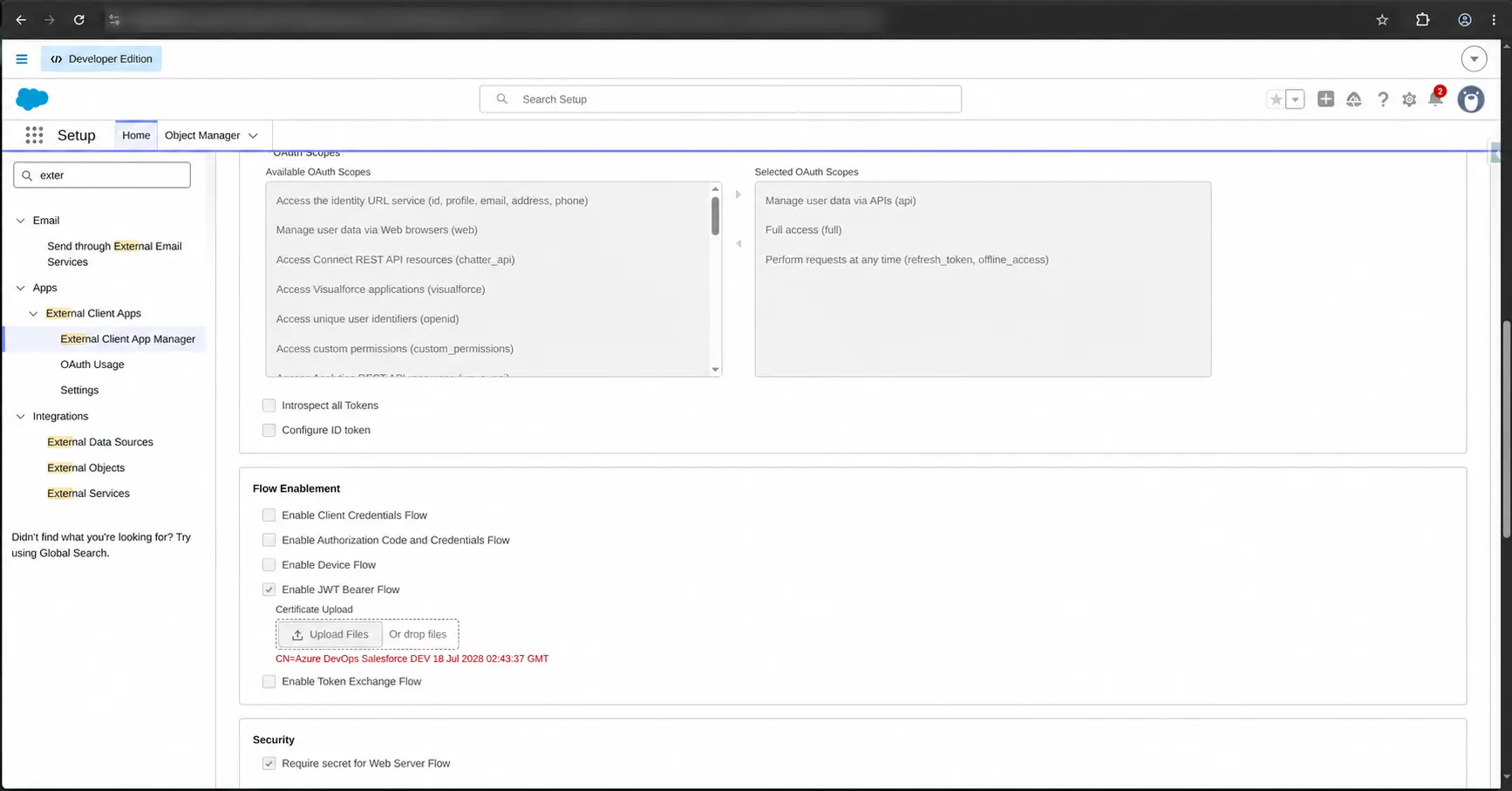
- Open Setup → External Client App Manager → New External Client App.
- Give it an environment-specific name, such as
Azure DevOps Salesforce DEV. The contact email is administrative metadata only; it is not used by the JWT command. - Set app authorization to Admin approved users are pre-authorized. This prevents arbitrary users from using the app.
- Under OAuth scopes, select the minimum scopes your deployment needs. The demo selects
api,fullandrefresh_token, offline_access. - Under Flow Enablement, check Enable JWT Bearer Flow, then upload the environment's
salesforce-*.crtfile. - Save the app, then authorize the deployment user or its profile in the app policy. Copy the Consumer Key into the matching Azure variable group; never put it in the repository.
7. Upload credentials to Azure DevOps
Upload salesforce-dev.key, salesforce-uat.key and salesforce-prod.key to Pipelines → Library → Secure files. Then create one variable group per destination: salesforce-dev-auth, salesforce-uat-auth and salesforce-prod-auth. Mark sensitive values as secret. The names below are consumed by the pipeline exactly as written.
| Variable | Example value | Store as secret? |
|---|---|---|
SF_DEV_CLIENT_ID | Consumer Key from the DEV External Client App | Yes |
SF_DEV_USERNAME | deployment@your-domain.dev | Recommended |
SF_DEV_INSTANCE_URL | https://your-dev-org.my.salesforce.com | No |
SF_UAT_CLIENT_ID, SF_UAT_USERNAME, SF_UAT_INSTANCE_URL | Equivalent UAT values | Protect client ID and username |
SF_PROD_CLIENT_ID, SF_PROD_USERNAME, SF_PROD_INSTANCE_URL | Equivalent PROD values | Protect client ID and username |
.crt is uploaded to Salesforce; the private .key is uploaded to Azure Secure Files. If a private key was ever committed, revoke or rotate it immediately rather than merely deleting it from the latest commit.Create the Azure environments and pipeline
- Open Pipelines → Environments and create
salesforce-dev,salesforce-uatandsalesforce-prod. The YAML deployment jobs reference these names exactly. - For UAT and PROD, add approval and check rules if your team requires a human gate before a deployment job starts.
- Open Pipelines → New pipeline, select Azure Repos Git, select this repository, then choose Existing Azure Pipelines YAML file.
- Select
/azure-pipelines.yml, save it, and authorize the pipeline to read the three variable groups and Secure Files when Azure DevOps prompts you. - Run the pipeline manually once against
dev. It should validate only; the YAML intentionally blocks manual deployment.
8. Protect the release branches
A pipeline by itself does not prevent a direct push. Configure branch policies on dev, uat and main so a pull request must pass Build Validation before it can be completed. Require at least one reviewer for UAT and PROD in a team setting.
- Open Repos → Branches, open the menu for
dev, then choose Branch policies. - Under Build validation, add this pipeline, set the trigger to automatic, and make the policy required.
- Repeat for
uatandmain. The YAML reads the PR target branch, so one pipeline definition maps each policy to its correct Salesforce org. - For
main, also require reviewers and consider limiting who may bypass policies.
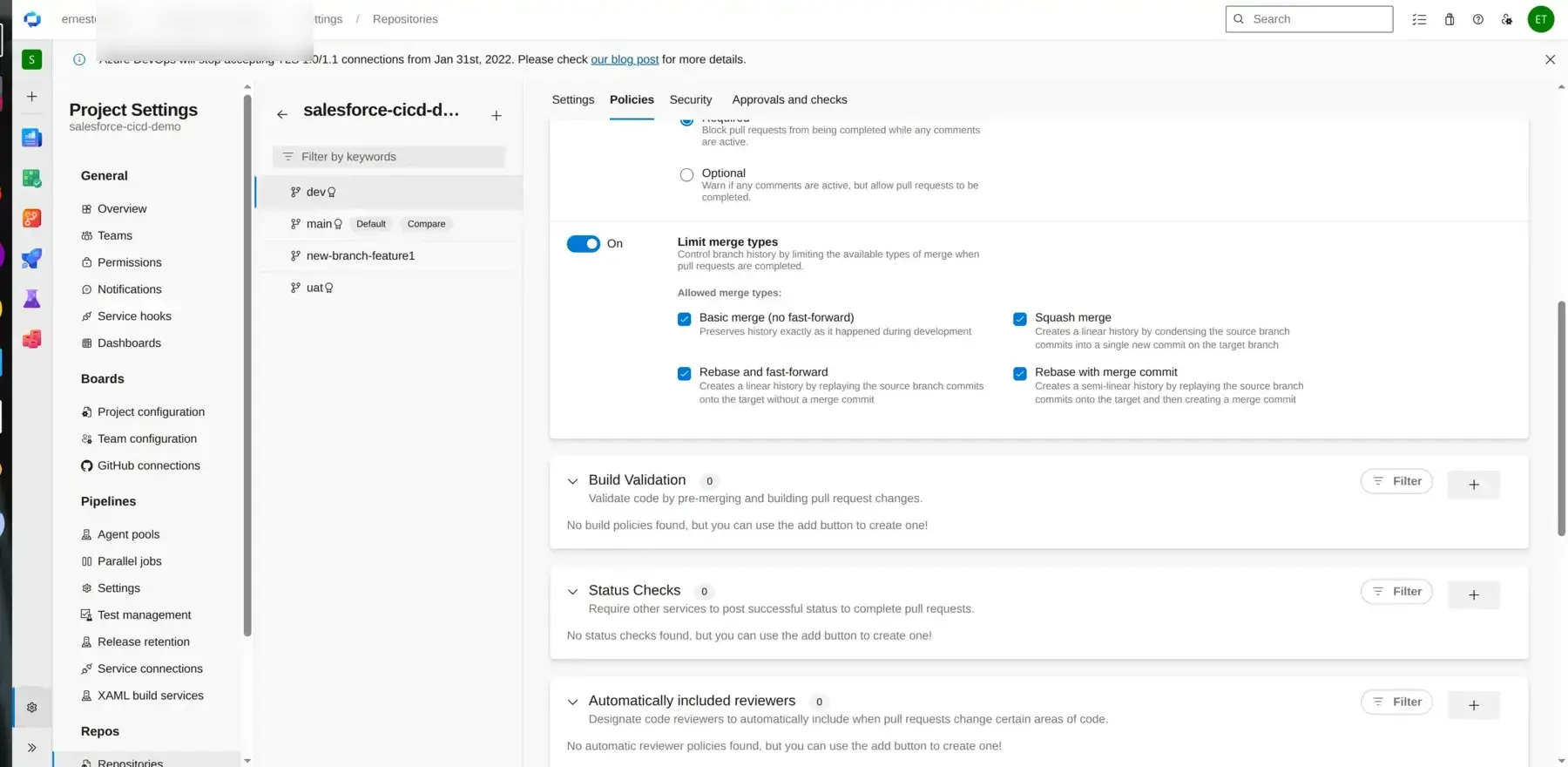
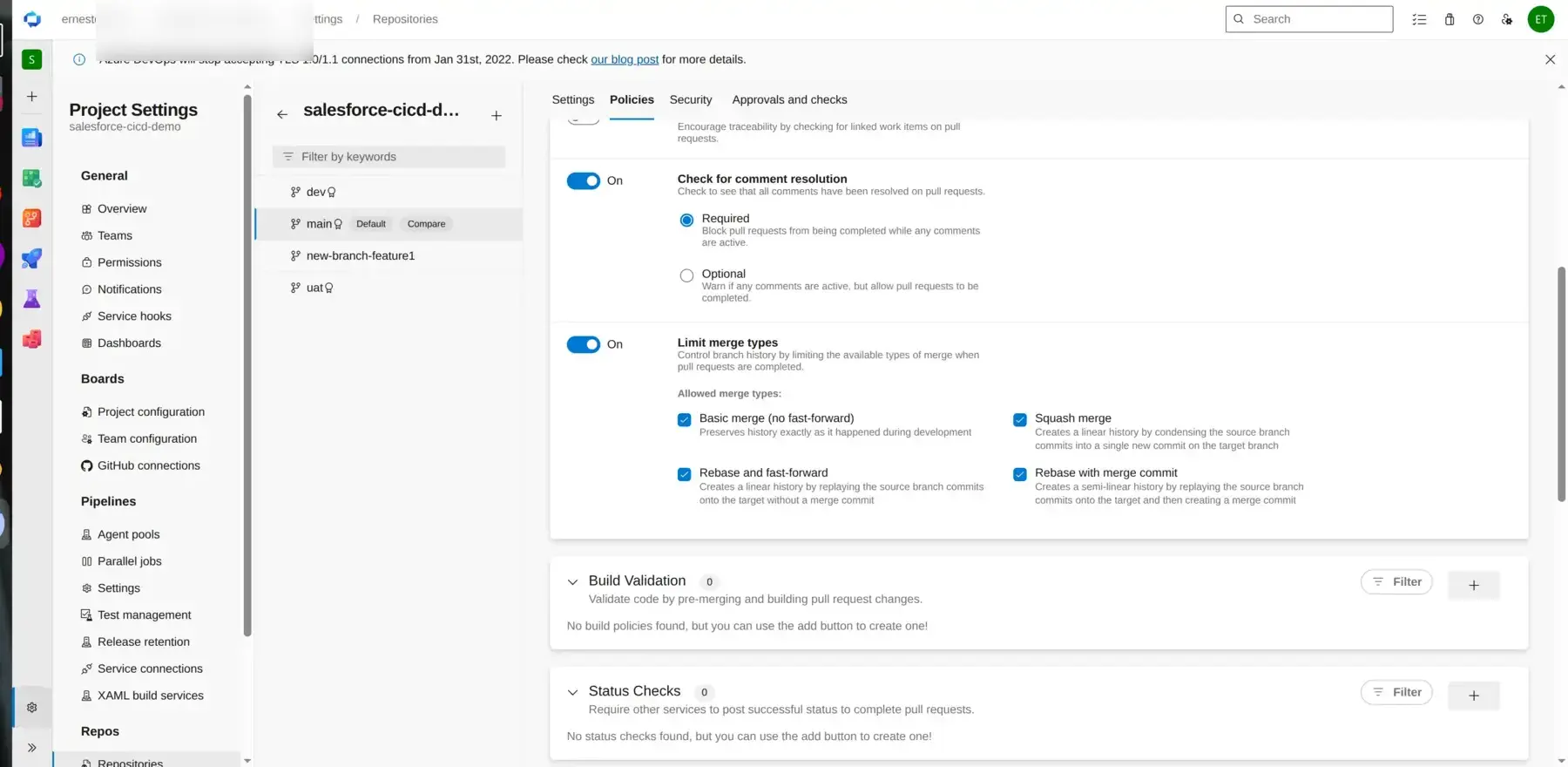
Configure the validation pipeline with the PR target branch as the Salesforce destination. This is why a feature-to-UAT PR validates against UAT, while a feature-to-main PR validates against PROD.
9. Add the complete pipeline
Save the following file as azure-pipelines.yml at the repository root. This is the complete pipeline used by the demo, including its three validation jobs and three deployment jobs. It deliberately uses pr: none: Azure Repos branch policies, not a YAML pr trigger, start PR validation.
name: salesforce-cicd-$(Date:yyyyMMdd).$(Rev:r)
# Azure Repos:
# - Pull requests run through Build Validation on dev, uat, and main.
# - Pushes to dev, uat, and main happen after the merge and run revalidation plus deployment.
trigger:
branches:
include:
- dev
- uat
- main
paths:
include:
- azure-pipelines.yml
- force-app/**
- manifest/**
- scripts/**
- config/**
- package.json
- package-lock.json
- sfdx-project.json
# Azure Repos pull requests are triggered through Build Validation branch policies.
pr: none
# Allows manual testing of the YAML from a working branch.
# A manual run ALWAYS validates; it never deploys.
parameters:
- name: manualTargetBranch
displayName: Rama Salesforce destino para una ejecución manual
type: string
default: dev
values:
- dev
- uat
- main
pool:
vmImage: ubuntu-latest
variables:
- group: salesforce-dev-auth
- group: salesforce-uat-auth
- group: salesforce-prod-auth
- name: SF_CLI_VERSION
value: '2'
- name: SGD_VERSION
value: '6.45.0'
- name: DEPLOY_WAIT_MINUTES
value: '60'
stages:
# ============================================================================
# 1. RESOLVE CONTEXT AND GENERATE DELTA
# ============================================================================
- stage: PrepareDelta
displayName: Preparar delta Salesforce
jobs:
- job: GenerateDelta
displayName: Resolver ramas y generar artifact delta
timeoutInMinutes: 25
steps:
- checkout: self
clean: true
fetchDepth: 0
persistCredentials: true
- task: NodeTool@0
displayName: Usar Node.js 22
inputs:
versionSpec: '22.x'
- bash: |
set -euo pipefail
npm install --global "@salesforce/cli@$(SF_CLI_VERSION)"
echo y | sf plugins install "sfdx-git-delta@$(SGD_VERSION)"
sf version
sf plugins
displayName: Instalar Salesforce CLI y SFDX-Git-Delta
- bash: |
set -euo pipefail
reason="$(Build.Reason)"
source_branch=""
target_branch=""
execution_mode=""
from_ref=""
to_ref="HEAD"
if [[ "$reason" == "PullRequest" ]]; then
execution_mode="pull-request"
source_branch="${SYSTEM_PULLREQUEST_SOURCEBRANCH#refs/heads/}"
target_branch="${SYSTEM_PULLREQUEST_TARGETBRANCH#refs/heads/}"
git fetch --force origin \
"+refs/heads/${target_branch}:refs/remotes/origin/${target_branch}"
# Azure Repos builds HEAD as a temporary merge commit for the pull request.
from_ref="origin/${target_branch}"
elif [[ "$reason" == "Manual" ]]; then
execution_mode="manual-validation"
source_branch="${BUILD_SOURCEBRANCH#refs/heads/}"
target_branch="${MANUAL_TARGET_BRANCH}"
git fetch --force origin \
"+refs/heads/${target_branch}:refs/remotes/origin/${target_branch}"
# Allows a working branch to be tested against dev, uat, or main without deploying.
from_ref="origin/${target_branch}"
else
execution_mode="merged-push"
source_branch="${BUILD_SOURCEBRANCH#refs/heads/}"
target_branch="${BUILD_SOURCEBRANCH#refs/heads/}"
# Requires Squash Merge or Merge Commit. HEAD^1 is the target branch
# state before the merge and HEAD is the merged result.
git rev-parse --verify HEAD^1 >/dev/null
from_ref="HEAD^1"
fi
case "$target_branch" in
dev)
target_environment="dev"
;;
uat)
target_environment="uat"
;;
main)
target_environment="prod"
;;
*)
echo "##vso[task.logissue type=error]Rama destino no soportada: $target_branch"
exit 1
;;
esac
echo "============================================================"
echo "Motivo Azure: $reason"
echo "Modo: $execution_mode"
echo "Rama origen: $source_branch"
echo "Rama destino: $target_branch"
echo "Entorno Salesforce: $target_environment"
echo "Delta desde: $from_ref"
echo "Delta hasta: $to_ref"
echo "============================================================"
delta_root="$(Build.ArtifactStagingDirectory)/salesforce-delta"
rm -rf "$delta_root"
mkdir -p "$delta_root"
sf sgd source delta \
--from "$from_ref" \
--to "$to_ref" \
--output-dir "$delta_root" \
--generate-delta
test -f "$delta_root/package/package.xml"
mkdir -p "$delta_root/destructiveChanges"
# SGD generates destructiveChanges.xml. Treat it as a post-deploy change.
if [[ -f "$delta_root/destructiveChanges/destructiveChanges.xml" ]]; then
mv \
"$delta_root/destructiveChanges/destructiveChanges.xml" \
"$delta_root/destructiveChanges/destructiveChangesPost.xml"
fi
api_version="$(node -p "require('./sfdx-project.json').sourceApiVersion || '67.0'")"
create_empty_manifest() {
local output_file="$1"
cat > "$output_file" <<EOF
<?xml version="1.0" encoding="UTF-8"?>
<Package xmlns="http://soap.sforce.com/2006/04/metadata">
<version>${api_version}</version>
</Package>
EOF
}
if [[ ! -f "$delta_root/destructiveChanges/destructiveChangesPost.xml" ]]; then
create_empty_manifest \
"$delta_root/destructiveChanges/destructiveChangesPost.xml"
fi
# Convention for pre-deployment deletions:
# manifest/destructiveChangesPre.xml is applied only when the file
# was added or modified in the current delta.
pre_manifest_repo="manifest/destructiveChangesPre.xml"
pre_manifest_delta="$delta_root/destructiveChanges/destructiveChangesPre.xml"
if git diff --name-only "$from_ref" "$to_ref" -- "$pre_manifest_repo" \
| grep -Fxq "$pre_manifest_repo" \
&& [[ -f "$pre_manifest_repo" ]]; then
cp "$pre_manifest_repo" "$pre_manifest_delta"
echo "Se incorporó destructiveChangesPre.xml del cambio actual."
else
create_empty_manifest "$pre_manifest_delta"
fi
# The artifact is a self-contained Salesforce project that includes
# only delta metadata and its manifests.
cp sfdx-project.json "$delta_root/sfdx-project.json"
if [[ -f .forceignore ]]; then
cp .forceignore "$delta_root/.forceignore"
fi
has_package=false
has_pre_destructive=false
has_post_destructive=false
if grep -q '<types>' "$delta_root/package/package.xml"; then
has_package=true
fi
if grep -q '<types>' "$pre_manifest_delta"; then
has_pre_destructive=true
fi
if grep -q '<types>' \
"$delta_root/destructiveChanges/destructiveChangesPost.xml"; then
has_post_destructive=true
fi
if [[ "$has_package" == "true" \
|| "$has_pre_destructive" == "true" \
|| "$has_post_destructive" == "true" ]]; then
has_delta=true
else
has_delta=false
fi
echo "============================================================"
echo "Package con metadata: $has_package"
echo "Destructive pre con metadata: $has_pre_destructive"
echo "Destructive post con metadata: $has_post_destructive"
echo "Existe delta Salesforce: $has_delta"
echo "============================================================"
echo "package/package.xml:"
cat "$delta_root/package/package.xml"
echo "destructiveChangesPre.xml:"
cat "$pre_manifest_delta"
echo "destructiveChangesPost.xml:"
cat "$delta_root/destructiveChanges/destructiveChangesPost.xml"
echo "Archivos incluidos en el artifact:"
find "$delta_root" -type f -print | sort
echo "##vso[task.setvariable variable=executionMode;isOutput=true]$execution_mode"
echo "##vso[task.setvariable variable=sourceBranch;isOutput=true]$source_branch"
echo "##vso[task.setvariable variable=targetBranch;isOutput=true]$target_branch"
echo "##vso[task.setvariable variable=targetEnvironment;isOutput=true]$target_environment"
echo "##vso[task.setvariable variable=hasDelta;isOutput=true]$has_delta"
name: deltaContext
displayName: Calcular delta y preparar manifests
env:
SYSTEM_PULLREQUEST_SOURCEBRANCH: $(System.PullRequest.SourceBranch)
SYSTEM_PULLREQUEST_TARGETBRANCH: $(System.PullRequest.TargetBranch)
BUILD_SOURCEBRANCH: $(Build.SourceBranch)
MANUAL_TARGET_BRANCH: ${{ parameters.manualTargetBranch }}
- task: PublishPipelineArtifact@1
displayName: Publicar artifact Salesforce delta
inputs:
targetPath: '$(Build.ArtifactStagingDirectory)/salesforce-delta'
artifact: salesforce-delta
# ============================================================================
# 2. PULL REQUEST OR MANUAL VALIDATION
# ============================================================================
- stage: ValidateChanges
displayName: Validar delta sin desplegar
dependsOn: PrepareDelta
condition: >-
and(
succeeded(),
eq(dependencies.PrepareDelta.outputs['GenerateDelta.deltaContext.hasDelta'], 'true'),
or(
eq(variables['Build.Reason'], 'PullRequest'),
eq(variables['Build.Reason'], 'Manual')
)
)
variables:
targetBranch: $[ stageDependencies.PrepareDelta.GenerateDelta.outputs['deltaContext.targetBranch'] ]
jobs:
- job: ValidateDev
displayName: Validar delta contra Salesforce DEV
condition: and(succeeded(), eq(variables['targetBranch'], 'dev'))
timeoutInMinutes: 75
steps:
- checkout: none
- task: DownloadPipelineArtifact@2
displayName: Descargar artifact delta
inputs:
artifact: salesforce-delta
path: '$(Pipeline.Workspace)/salesforce-delta'
- task: DownloadSecureFile@1
name: salesforceJwtKeyDev
displayName: Descargar clave JWT de DEV
inputs:
secureFile: salesforce-dev.key
- task: NodeTool@0
displayName: Usar Node.js 22
inputs:
versionSpec: '22.x'
- bash: |
set -euo pipefail
npm install --global "@salesforce/cli@$(SF_CLI_VERSION)"
cd "$(Pipeline.Workspace)/salesforce-delta"
sf org login jwt \
--client-id "$SF_CLIENT_ID" \
--jwt-key-file "$JWT_KEY_FILE" \
--username "$SF_USERNAME" \
--instance-url "$SF_INSTANCE_URL" \
--alias cicd-target
deploy_args=(
--dry-run
--manifest "$PWD/package/package.xml"
--target-org cicd-target
--test-level RunLocalTests
--wait "$(DEPLOY_WAIT_MINUTES)"
--concise
)
if grep -q '<types>' "$PWD/destructiveChanges/destructiveChangesPre.xml"; then
deploy_args+=(
--pre-destructive-changes
"$PWD/destructiveChanges/destructiveChangesPre.xml"
)
fi
if grep -q '<types>' "$PWD/destructiveChanges/destructiveChangesPost.xml"; then
deploy_args+=(
--post-destructive-changes
"$PWD/destructiveChanges/destructiveChangesPost.xml"
)
fi
sf project deploy start "${deploy_args[@]}"
displayName: Autenticar y ejecutar dry-run en DEV
env:
JWT_KEY_FILE: $(salesforceJwtKeyDev.secureFilePath)
SF_CLIENT_ID: $(SF_DEV_CLIENT_ID)
SF_USERNAME: $(SF_DEV_USERNAME)
SF_INSTANCE_URL: $(SF_DEV_INSTANCE_URL)
- job: ValidateUat
displayName: Validar delta contra Salesforce UAT
condition: and(succeeded(), eq(variables['targetBranch'], 'uat'))
timeoutInMinutes: 75
steps:
- checkout: none
- task: DownloadPipelineArtifact@2
displayName: Descargar artifact delta
inputs:
artifact: salesforce-delta
path: '$(Pipeline.Workspace)/salesforce-delta'
- task: DownloadSecureFile@1
name: salesforceJwtKeyUat
displayName: Descargar clave JWT de UAT
inputs:
secureFile: salesforce-uat.key
- task: NodeTool@0
displayName: Usar Node.js 22
inputs:
versionSpec: '22.x'
- bash: |
set -euo pipefail
npm install --global "@salesforce/cli@$(SF_CLI_VERSION)"
cd "$(Pipeline.Workspace)/salesforce-delta"
sf org login jwt \
--client-id "$SF_CLIENT_ID" \
--jwt-key-file "$JWT_KEY_FILE" \
--username "$SF_USERNAME" \
--instance-url "$SF_INSTANCE_URL" \
--alias cicd-target
deploy_args=(
--dry-run
--manifest "$PWD/package/package.xml"
--target-org cicd-target
--test-level RunLocalTests
--wait "$(DEPLOY_WAIT_MINUTES)"
--concise
)
if grep -q '<types>' "$PWD/destructiveChanges/destructiveChangesPre.xml"; then
deploy_args+=(
--pre-destructive-changes
"$PWD/destructiveChanges/destructiveChangesPre.xml"
)
fi
if grep -q '<types>' "$PWD/destructiveChanges/destructiveChangesPost.xml"; then
deploy_args+=(
--post-destructive-changes
"$PWD/destructiveChanges/destructiveChangesPost.xml"
)
fi
sf project deploy start "${deploy_args[@]}"
displayName: Autenticar y ejecutar dry-run en UAT
env:
JWT_KEY_FILE: $(salesforceJwtKeyUat.secureFilePath)
SF_CLIENT_ID: $(SF_UAT_CLIENT_ID)
SF_USERNAME: $(SF_UAT_USERNAME)
SF_INSTANCE_URL: $(SF_UAT_INSTANCE_URL)
- job: ValidateProd
displayName: Validar delta contra Salesforce PROD
condition: and(succeeded(), eq(variables['targetBranch'], 'main'))
timeoutInMinutes: 90
steps:
- checkout: none
- task: DownloadPipelineArtifact@2
displayName: Descargar artifact delta
inputs:
artifact: salesforce-delta
path: '$(Pipeline.Workspace)/salesforce-delta'
- task: DownloadSecureFile@1
name: salesforceJwtKeyProd
displayName: Descargar clave JWT de PROD
inputs:
secureFile: salesforce-prod.key
- task: NodeTool@0
displayName: Usar Node.js 22
inputs:
versionSpec: '22.x'
- bash: |
set -euo pipefail
npm install --global "@salesforce/cli@$(SF_CLI_VERSION)"
cd "$(Pipeline.Workspace)/salesforce-delta"
sf org login jwt \
--client-id "$SF_CLIENT_ID" \
--jwt-key-file "$JWT_KEY_FILE" \
--username "$SF_USERNAME" \
--instance-url "$SF_INSTANCE_URL" \
--alias cicd-target
deploy_args=(
--dry-run
--manifest "$PWD/package/package.xml"
--target-org cicd-target
--test-level RunLocalTests
--wait "$(DEPLOY_WAIT_MINUTES)"
--concise
)
if grep -q '<types>' "$PWD/destructiveChanges/destructiveChangesPre.xml"; then
deploy_args+=(
--pre-destructive-changes
"$PWD/destructiveChanges/destructiveChangesPre.xml"
)
fi
if grep -q '<types>' "$PWD/destructiveChanges/destructiveChangesPost.xml"; then
deploy_args+=(
--post-destructive-changes
"$PWD/destructiveChanges/destructiveChangesPost.xml"
)
fi
sf project deploy start "${deploy_args[@]}"
displayName: Autenticar y ejecutar dry-run en PROD
env:
JWT_KEY_FILE: $(salesforceJwtKeyProd.secureFilePath)
SF_CLIENT_ID: $(SF_PROD_CLIENT_ID)
SF_USERNAME: $(SF_PROD_USERNAME)
SF_INSTANCE_URL: $(SF_PROD_INSTANCE_URL)
# ============================================================================
# 3. REVALIDATE THE DELTA AFTER THE MERGE
# ============================================================================
- stage: ValidateMergedDelta
displayName: Revalidar delta mergeado
dependsOn: PrepareDelta
condition: >-
and(
succeeded(),
ne(variables['Build.Reason'], 'PullRequest'),
ne(variables['Build.Reason'], 'Manual'),
eq(dependencies.PrepareDelta.outputs['GenerateDelta.deltaContext.hasDelta'], 'true')
)
variables:
targetBranch: $[ stageDependencies.PrepareDelta.GenerateDelta.outputs['deltaContext.targetBranch'] ]
jobs:
- job: RevalidateDev
displayName: Revalidar merge contra Salesforce DEV
condition: and(succeeded(), eq(variables['targetBranch'], 'dev'))
timeoutInMinutes: 75
steps:
- checkout: none
- task: DownloadPipelineArtifact@2
displayName: Descargar artifact delta
inputs:
artifact: salesforce-delta
path: '$(Pipeline.Workspace)/salesforce-delta'
- task: DownloadSecureFile@1
name: salesforceJwtKeyDev
displayName: Descargar clave JWT de DEV
inputs:
secureFile: salesforce-dev.key
- task: NodeTool@0
displayName: Usar Node.js 22
inputs:
versionSpec: '22.x'
- bash: |
set -euo pipefail
npm install --global "@salesforce/cli@$(SF_CLI_VERSION)"
cd "$(Pipeline.Workspace)/salesforce-delta"
sf org login jwt \
--client-id "$SF_CLIENT_ID" \
--jwt-key-file "$JWT_KEY_FILE" \
--username "$SF_USERNAME" \
--instance-url "$SF_INSTANCE_URL" \
--alias cicd-target
deploy_args=(
--dry-run
--manifest "$PWD/package/package.xml"
--target-org cicd-target
--test-level RunLocalTests
--wait "$(DEPLOY_WAIT_MINUTES)"
--concise
)
if grep -q '<types>' "$PWD/destructiveChanges/destructiveChangesPre.xml"; then
deploy_args+=(--pre-destructive-changes "$PWD/destructiveChanges/destructiveChangesPre.xml")
fi
if grep -q '<types>' "$PWD/destructiveChanges/destructiveChangesPost.xml"; then
deploy_args+=(--post-destructive-changes "$PWD/destructiveChanges/destructiveChangesPost.xml")
fi
sf project deploy start "${deploy_args[@]}"
displayName: Dry-run del merge en DEV
env:
JWT_KEY_FILE: $(salesforceJwtKeyDev.secureFilePath)
SF_CLIENT_ID: $(SF_DEV_CLIENT_ID)
SF_USERNAME: $(SF_DEV_USERNAME)
SF_INSTANCE_URL: $(SF_DEV_INSTANCE_URL)
- job: RevalidateUat
displayName: Revalidar merge contra Salesforce UAT
condition: and(succeeded(), eq(variables['targetBranch'], 'uat'))
timeoutInMinutes: 75
steps:
- checkout: none
- task: DownloadPipelineArtifact@2
displayName: Descargar artifact delta
inputs:
artifact: salesforce-delta
path: '$(Pipeline.Workspace)/salesforce-delta'
- task: DownloadSecureFile@1
name: salesforceJwtKeyUat
displayName: Descargar clave JWT de UAT
inputs:
secureFile: salesforce-uat.key
- task: NodeTool@0
displayName: Usar Node.js 22
inputs:
versionSpec: '22.x'
- bash: |
set -euo pipefail
npm install --global "@salesforce/cli@$(SF_CLI_VERSION)"
cd "$(Pipeline.Workspace)/salesforce-delta"
sf org login jwt \
--client-id "$SF_CLIENT_ID" \
--jwt-key-file "$JWT_KEY_FILE" \
--username "$SF_USERNAME" \
--instance-url "$SF_INSTANCE_URL" \
--alias cicd-target
deploy_args=(
--dry-run
--manifest "$PWD/package/package.xml"
--target-org cicd-target
--test-level RunLocalTests
--wait "$(DEPLOY_WAIT_MINUTES)"
--concise
)
if grep -q '<types>' "$PWD/destructiveChanges/destructiveChangesPre.xml"; then
deploy_args+=(--pre-destructive-changes "$PWD/destructiveChanges/destructiveChangesPre.xml")
fi
if grep -q '<types>' "$PWD/destructiveChanges/destructiveChangesPost.xml"; then
deploy_args+=(--post-destructive-changes "$PWD/destructiveChanges/destructiveChangesPost.xml")
fi
sf project deploy start "${deploy_args[@]}"
displayName: Dry-run del merge en UAT
env:
JWT_KEY_FILE: $(salesforceJwtKeyUat.secureFilePath)
SF_CLIENT_ID: $(SF_UAT_CLIENT_ID)
SF_USERNAME: $(SF_UAT_USERNAME)
SF_INSTANCE_URL: $(SF_UAT_INSTANCE_URL)
- job: RevalidateProd
displayName: Revalidar merge contra Salesforce PROD
condition: and(succeeded(), eq(variables['targetBranch'], 'main'))
timeoutInMinutes: 90
steps:
- checkout: none
- task: DownloadPipelineArtifact@2
displayName: Descargar artifact delta
inputs:
artifact: salesforce-delta
path: '$(Pipeline.Workspace)/salesforce-delta'
- task: DownloadSecureFile@1
name: salesforceJwtKeyProd
displayName: Descargar clave JWT de PROD
inputs:
secureFile: salesforce-prod.key
- task: NodeTool@0
displayName: Usar Node.js 22
inputs:
versionSpec: '22.x'
- bash: |
set -euo pipefail
npm install --global "@salesforce/cli@$(SF_CLI_VERSION)"
cd "$(Pipeline.Workspace)/salesforce-delta"
sf org login jwt \
--client-id "$SF_CLIENT_ID" \
--jwt-key-file "$JWT_KEY_FILE" \
--username "$SF_USERNAME" \
--instance-url "$SF_INSTANCE_URL" \
--alias cicd-target
deploy_args=(
--dry-run
--manifest "$PWD/package/package.xml"
--target-org cicd-target
--test-level RunLocalTests
--wait "$(DEPLOY_WAIT_MINUTES)"
--concise
)
if grep -q '<types>' "$PWD/destructiveChanges/destructiveChangesPre.xml"; then
deploy_args+=(--pre-destructive-changes "$PWD/destructiveChanges/destructiveChangesPre.xml")
fi
if grep -q '<types>' "$PWD/destructiveChanges/destructiveChangesPost.xml"; then
deploy_args+=(--post-destructive-changes "$PWD/destructiveChanges/destructiveChangesPost.xml")
fi
sf project deploy start "${deploy_args[@]}"
displayName: Dry-run del merge en PROD
env:
JWT_KEY_FILE: $(salesforceJwtKeyProd.secureFilePath)
SF_CLIENT_ID: $(SF_PROD_CLIENT_ID)
SF_USERNAME: $(SF_PROD_USERNAME)
SF_INSTANCE_URL: $(SF_PROD_INSTANCE_URL)
# ============================================================================
# 4. DEPLOY THE SAME ARTIFACT THAT WAS REVALIDATED
# ============================================================================
- stage: DeployMergedDelta
displayName: Desplegar delta mergeado
dependsOn:
- PrepareDelta
- ValidateMergedDelta
condition: >-
and(
succeeded(),
ne(variables['Build.Reason'], 'PullRequest'),
ne(variables['Build.Reason'], 'Manual'),
eq(dependencies.PrepareDelta.outputs['GenerateDelta.deltaContext.hasDelta'], 'true')
)
variables:
targetBranch: $[ stageDependencies.PrepareDelta.GenerateDelta.outputs['deltaContext.targetBranch'] ]
jobs:
- deployment: DeployDev
displayName: Desplegar delta en Salesforce DEV
environment: salesforce-dev
condition: and(succeeded(), eq(variables['targetBranch'], 'dev'))
timeoutInMinutes: 75
strategy:
runOnce:
deploy:
steps:
- checkout: none
- task: DownloadPipelineArtifact@2
displayName: Descargar artifact delta validado
inputs:
artifact: salesforce-delta
path: '$(Pipeline.Workspace)/salesforce-delta'
- task: DownloadSecureFile@1
name: salesforceJwtKeyDev
displayName: Descargar clave JWT de DEV
inputs:
secureFile: salesforce-dev.key
- task: NodeTool@0
displayName: Usar Node.js 22
inputs:
versionSpec: '22.x'
- bash: |
set -euo pipefail
npm install --global "@salesforce/cli@$(SF_CLI_VERSION)"
cd "$(Pipeline.Workspace)/salesforce-delta"
sf org login jwt \
--client-id "$SF_CLIENT_ID" \
--jwt-key-file "$JWT_KEY_FILE" \
--username "$SF_USERNAME" \
--instance-url "$SF_INSTANCE_URL" \
--alias cicd-target
deploy_args=(
--manifest "$PWD/package/package.xml"
--target-org cicd-target
--test-level RunLocalTests
--wait "$(DEPLOY_WAIT_MINUTES)"
--concise
)
if grep -q '<types>' "$PWD/destructiveChanges/destructiveChangesPre.xml"; then
deploy_args+=(--pre-destructive-changes "$PWD/destructiveChanges/destructiveChangesPre.xml")
fi
if grep -q '<types>' "$PWD/destructiveChanges/destructiveChangesPost.xml"; then
deploy_args+=(--post-destructive-changes "$PWD/destructiveChanges/destructiveChangesPost.xml")
fi
sf project deploy start "${deploy_args[@]}"
displayName: Deploy efectivo en DEV
env:
JWT_KEY_FILE: $(salesforceJwtKeyDev.secureFilePath)
SF_CLIENT_ID: $(SF_DEV_CLIENT_ID)
SF_USERNAME: $(SF_DEV_USERNAME)
SF_INSTANCE_URL: $(SF_DEV_INSTANCE_URL)
- deployment: DeployUat
displayName: Desplegar delta en Salesforce UAT
environment: salesforce-uat
condition: and(succeeded(), eq(variables['targetBranch'], 'uat'))
timeoutInMinutes: 75
strategy:
runOnce:
deploy:
steps:
- checkout: none
- task: DownloadPipelineArtifact@2
displayName: Descargar artifact delta validado
inputs:
artifact: salesforce-delta
path: '$(Pipeline.Workspace)/salesforce-delta'
- task: DownloadSecureFile@1
name: salesforceJwtKeyUat
displayName: Descargar clave JWT de UAT
inputs:
secureFile: salesforce-uat.key
- task: NodeTool@0
displayName: Usar Node.js 22
inputs:
versionSpec: '22.x'
- bash: |
set -euo pipefail
npm install --global "@salesforce/cli@$(SF_CLI_VERSION)"
cd "$(Pipeline.Workspace)/salesforce-delta"
sf org login jwt \
--client-id "$SF_CLIENT_ID" \
--jwt-key-file "$JWT_KEY_FILE" \
--username "$SF_USERNAME" \
--instance-url "$SF_INSTANCE_URL" \
--alias cicd-target
deploy_args=(
--manifest "$PWD/package/package.xml"
--target-org cicd-target
--test-level RunLocalTests
--wait "$(DEPLOY_WAIT_MINUTES)"
--concise
)
if grep -q '<types>' "$PWD/destructiveChanges/destructiveChangesPre.xml"; then
deploy_args+=(--pre-destructive-changes "$PWD/destructiveChanges/destructiveChangesPre.xml")
fi
if grep -q '<types>' "$PWD/destructiveChanges/destructiveChangesPost.xml"; then
deploy_args+=(--post-destructive-changes "$PWD/destructiveChanges/destructiveChangesPost.xml")
fi
sf project deploy start "${deploy_args[@]}"
displayName: Deploy efectivo en UAT
env:
JWT_KEY_FILE: $(salesforceJwtKeyUat.secureFilePath)
SF_CLIENT_ID: $(SF_UAT_CLIENT_ID)
SF_USERNAME: $(SF_UAT_USERNAME)
SF_INSTANCE_URL: $(SF_UAT_INSTANCE_URL)
- deployment: DeployProd
displayName: Desplegar delta en Salesforce PROD
environment: salesforce-prod
condition: and(succeeded(), eq(variables['targetBranch'], 'main'))
timeoutInMinutes: 90
strategy:
runOnce:
deploy:
steps:
- checkout: none
- task: DownloadPipelineArtifact@2
displayName: Descargar artifact delta validado
inputs:
artifact: salesforce-delta
path: '$(Pipeline.Workspace)/salesforce-delta'
- task: DownloadSecureFile@1
name: salesforceJwtKeyProd
displayName: Descargar clave JWT de PROD
inputs:
secureFile: salesforce-prod.key
- task: NodeTool@0
displayName: Usar Node.js 22
inputs:
versionSpec: '22.x'
- bash: |
set -euo pipefail
npm install --global "@salesforce/cli@$(SF_CLI_VERSION)"
cd "$(Pipeline.Workspace)/salesforce-delta"
sf org login jwt \
--client-id "$SF_CLIENT_ID" \
--jwt-key-file "$JWT_KEY_FILE" \
--username "$SF_USERNAME" \
--instance-url "$SF_INSTANCE_URL" \
--alias cicd-target
deploy_args=(
--manifest "$PWD/package/package.xml"
--target-org cicd-target
--test-level RunLocalTests
--wait "$(DEPLOY_WAIT_MINUTES)"
--concise
)
if grep -q '<types>' "$PWD/destructiveChanges/destructiveChangesPre.xml"; then
deploy_args+=(--pre-destructive-changes "$PWD/destructiveChanges/destructiveChangesPre.xml")
fi
if grep -q '<types>' "$PWD/destructiveChanges/destructiveChangesPost.xml"; then
deploy_args+=(--post-destructive-changes "$PWD/destructiveChanges/destructiveChangesPost.xml")
fi
sf project deploy start "${deploy_args[@]}"
displayName: Deploy efectivo en PROD
env:
JWT_KEY_FILE: $(salesforceJwtKeyProd.secureFilePath)
SF_CLIENT_ID: $(SF_PROD_CLIENT_ID)
SF_USERNAME: $(SF_PROD_USERNAME)
SF_INSTANCE_URL: $(SF_PROD_INSTANCE_URL)10. Read the YAML in small pieces
The full file is intentionally repetitive at the environment boundary: each environment gets an explicit key, variable group and job. That repetition makes the deployment destination easy to audit. The important logic is shared through the same command pattern.
Triggers and manual safety
trigger:
  branches:
    include: [dev, uat, main]

pr: none

parameters:
  - name: manualTargetBranch
    type: string
    default: dev
    values: [dev, uat, main]
A push to a release branch runs the post-merge path. Build Validation invokes the same YAML for pull requests. A manual run can compare a working branch against a chosen target, but its condition permits validation only; it cannot deploy.
Variables and tool versions
variables:
  - group: salesforce-dev-auth
  - group: salesforce-uat-auth
  - group: salesforce-prod-auth
  - name: SF_CLI_VERSION
    value: '2'
  - name: SGD_VERSION
    value: '6.45.0'
  - name: DEPLOY_WAIT_MINUTES
    value: '60'
Variable groups keep per-environment values out of the repository. Pinning the SFDX-Git-Delta version gives more predictable builds than silently accepting a future breaking change.
Generate a delta, not a full deployment
sf sgd source delta \
  --from "$from_ref" \
  --to "HEAD" \
  --output-dir "$delta_root" \
  --generate-delta

sf project deploy start \
  --manifest "$PWD/package/package.xml" \
  --target-org cicd-target \
  --test-level RunLocalTests \
  --wait "$(DEPLOY_WAIT_MINUTES)" \
  --concise
SFDX-Git-Delta compares two Git references and writes a minimal package. For a PR, the base is the target branch; for a merged push, it is HEAD^1, the branch state immediately before the merge. The pipeline also handles pre- and post-destructive manifests, so deletions can be deployed in the correct order.
JWT login and dry-run validation
sf org login jwt \
  --client-id "$SF_CLIENT_ID" \
  --jwt-key-file "$JWT_KEY_FILE" \
  --username "$SF_USERNAME" \
  --instance-url "$SF_INSTANCE_URL" \
  --alias cicd-target

sf project deploy start "${deploy_args[@]}"
The validation jobs add --dry-run to deploy_args. They authenticate with the Secure File downloaded at runtime, validate the delta and run local Apex tests, but do not change the org. The deployment jobs use the same artifact after revalidation without --dry-run.
11. Make a first metadata change
Create a feature branch from the branch you want to promote into. For this example, start from dev and add one custom object, a field, a permission set, an Apex service and its test. The point is not the business feature; it is proving that different Salesforce metadata types travel through the exact same delivery route.
git checkout dev
git pull origin dev
git checkout -b feature/cicd-prueba-metadata

# Create the metadata with VS Code + Salesforce extensions,
# then retrieve or save it under force-app/main/default.
git status
git add force-app
git commit -m "Add CI CD test metadata"
git push --set-upstream origin feature/cicd-prueba-metadata
The example class is deliberately small. Its test covers behavior with and without input, creates the custom-object record and verifies the stored field value. That gives the validation job a real Apex test to run.
public with sharing class CICD_PruebaService {
    public static String buildMessage(String nombre) {
        if (String.isBlank(nombre)) {
            return 'CI/CD funcionando';
        }

        return 'CI/CD funcionando para ' + nombre.trim();
    }

    public static CICD_Prueba__c buildRecord(String estado) {
        CICD_Prueba__c registro = new CICD_Prueba__c();
        registro.Estado__c = String.isBlank(estado) ? 'Pendiente' : estado.trim();
        return registro;
    }
}
@IsTest
private class CICD_PruebaServiceTest {
@IsTest
static void insertarRegistro() {
CICD_Prueba__c registro = CICD_PruebaService.buildRecord('Creado por test');
insert registro;
CICD_Prueba__c resultado = [
SELECT Estado__c
FROM CICD_Prueba__c
WHERE Id = :registro.Id
];
System.assertEquals('Creado por test', resultado.Estado__c);
}
}12. Open the pull request, inspect the changes and validate
Create a pull request from feature/cicd-prueba-metadata into dev. Before approving anything, open the Files tab and verify the changed components. This is where you confirm that the PR contains the Apex class, test, custom object, field and permission set you actually intended to promote.
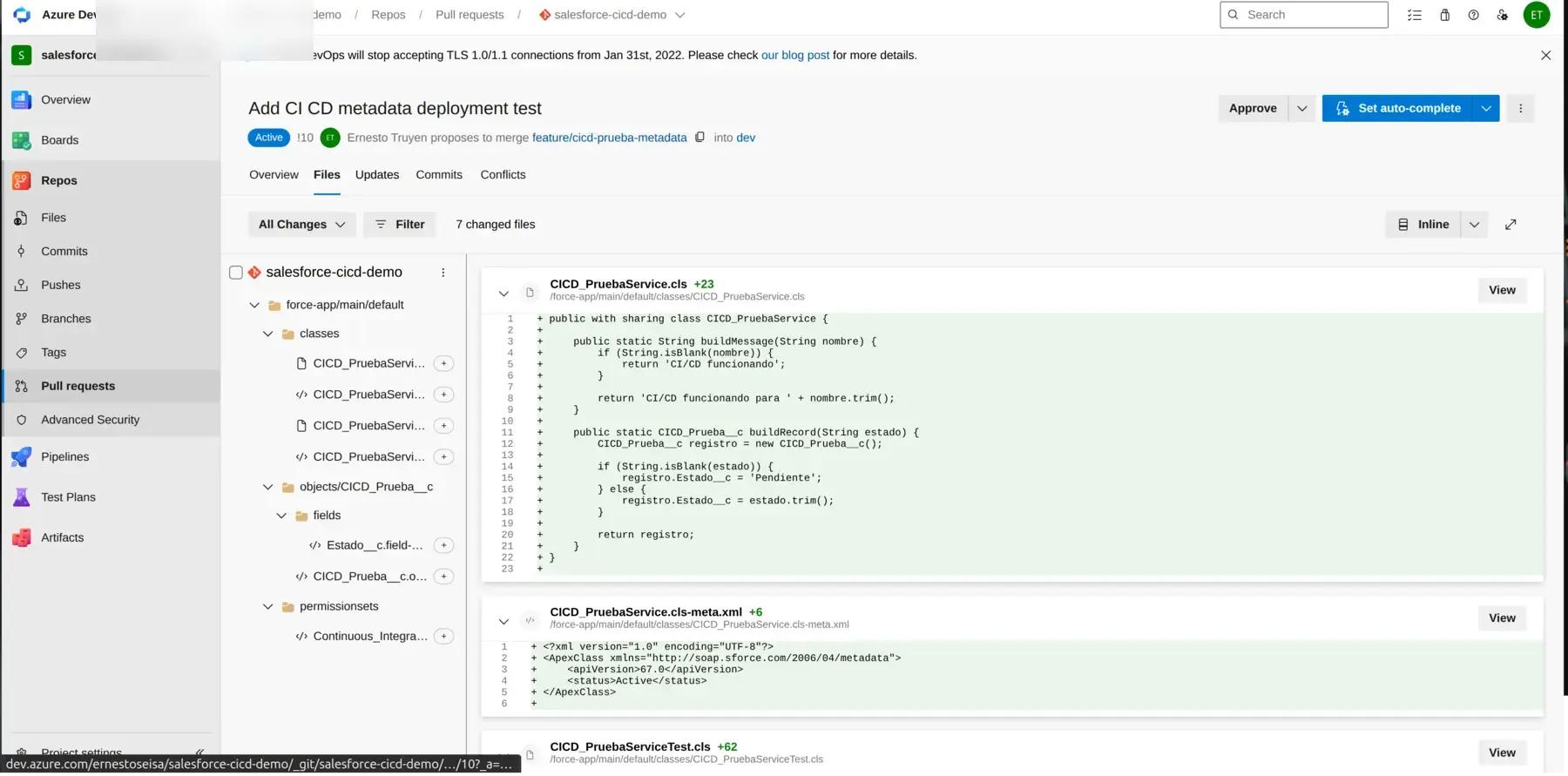
Once the PR is created, Azure Repos branch policy starts Build Validation. The run must first prepare the delta and then authenticate against the target Salesforce org to run a dry-run. A PR does not deploy: its job is to prove that the exact metadata can be deployed and that Apex tests pass.
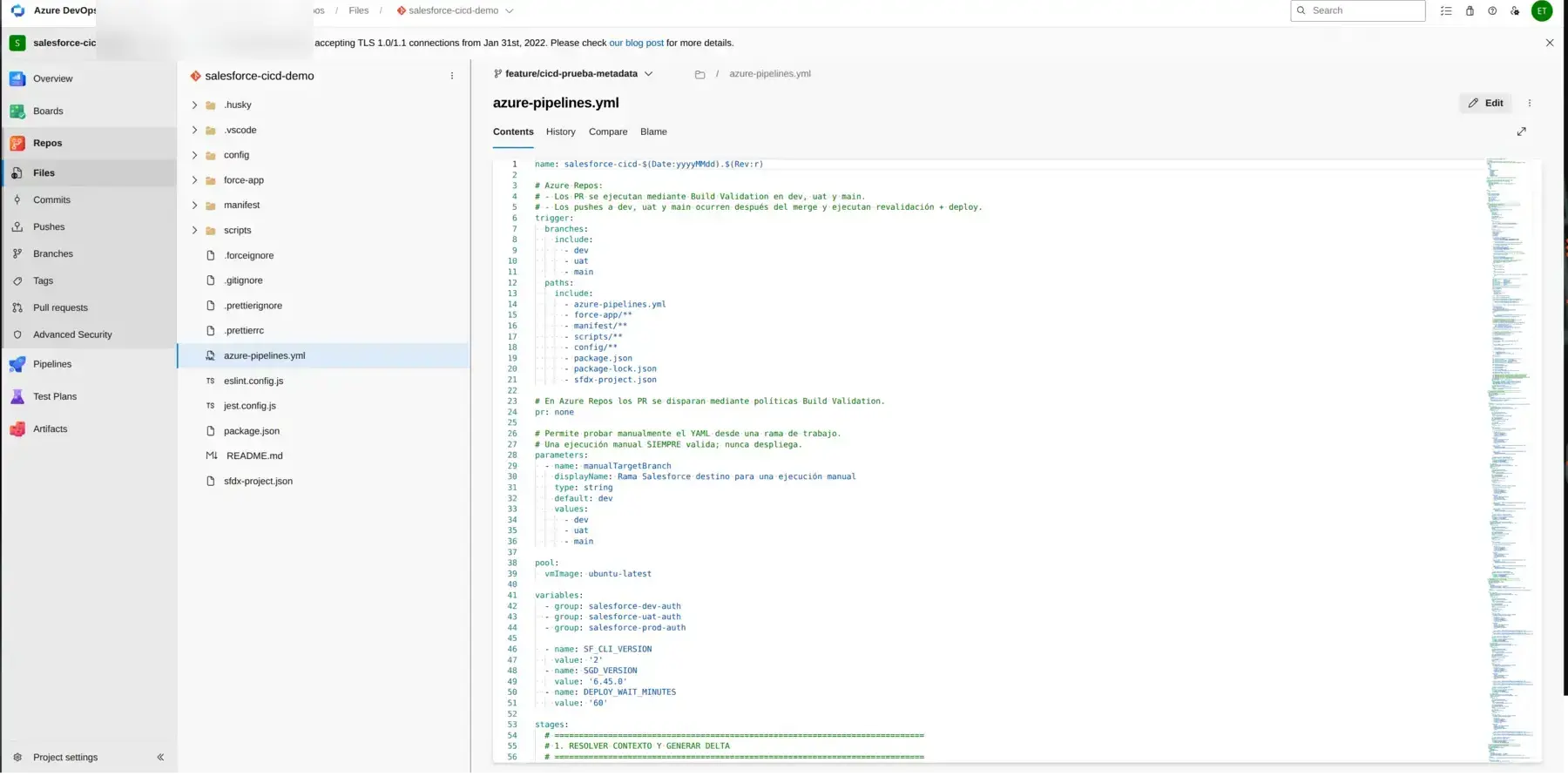
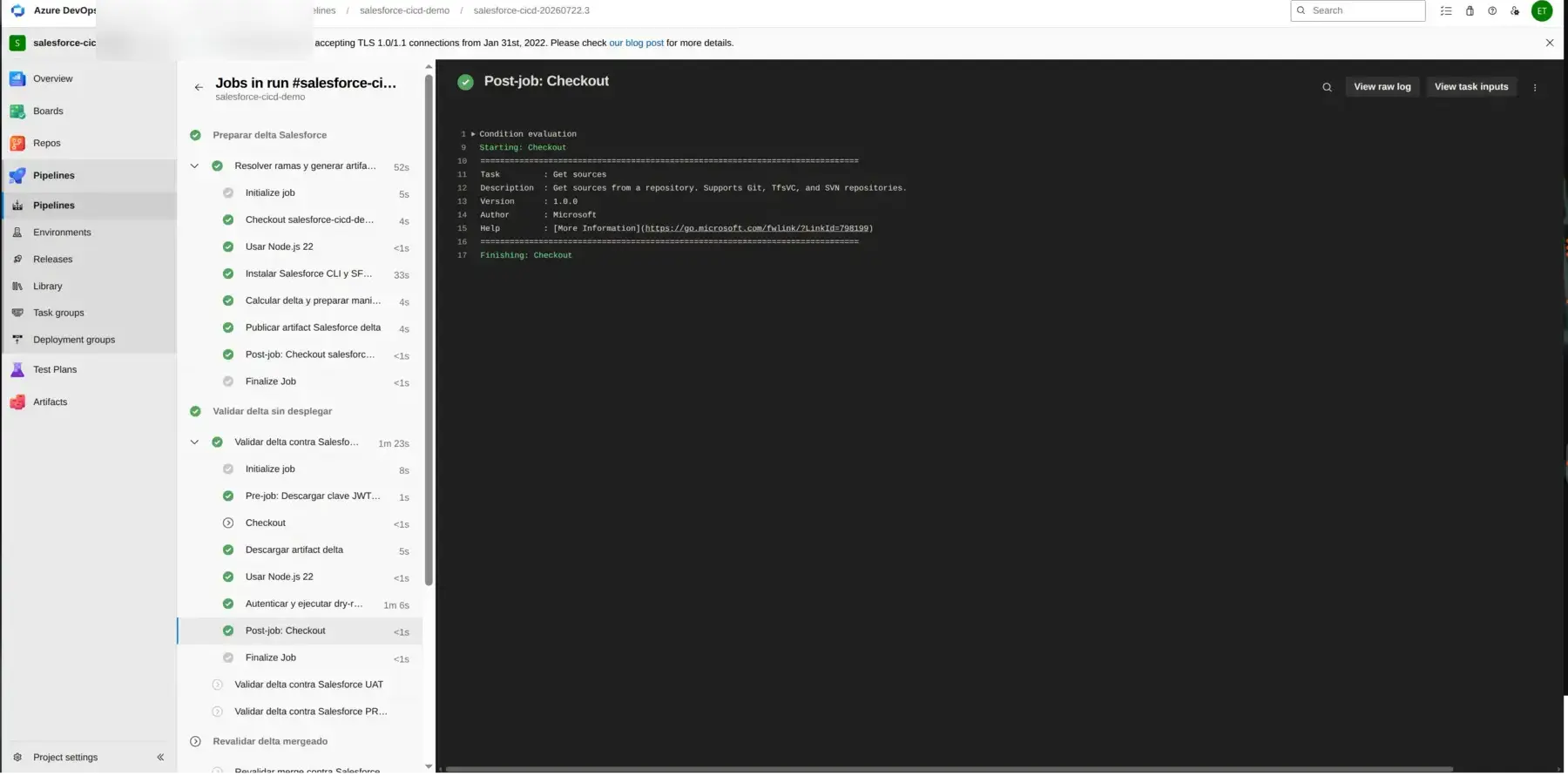
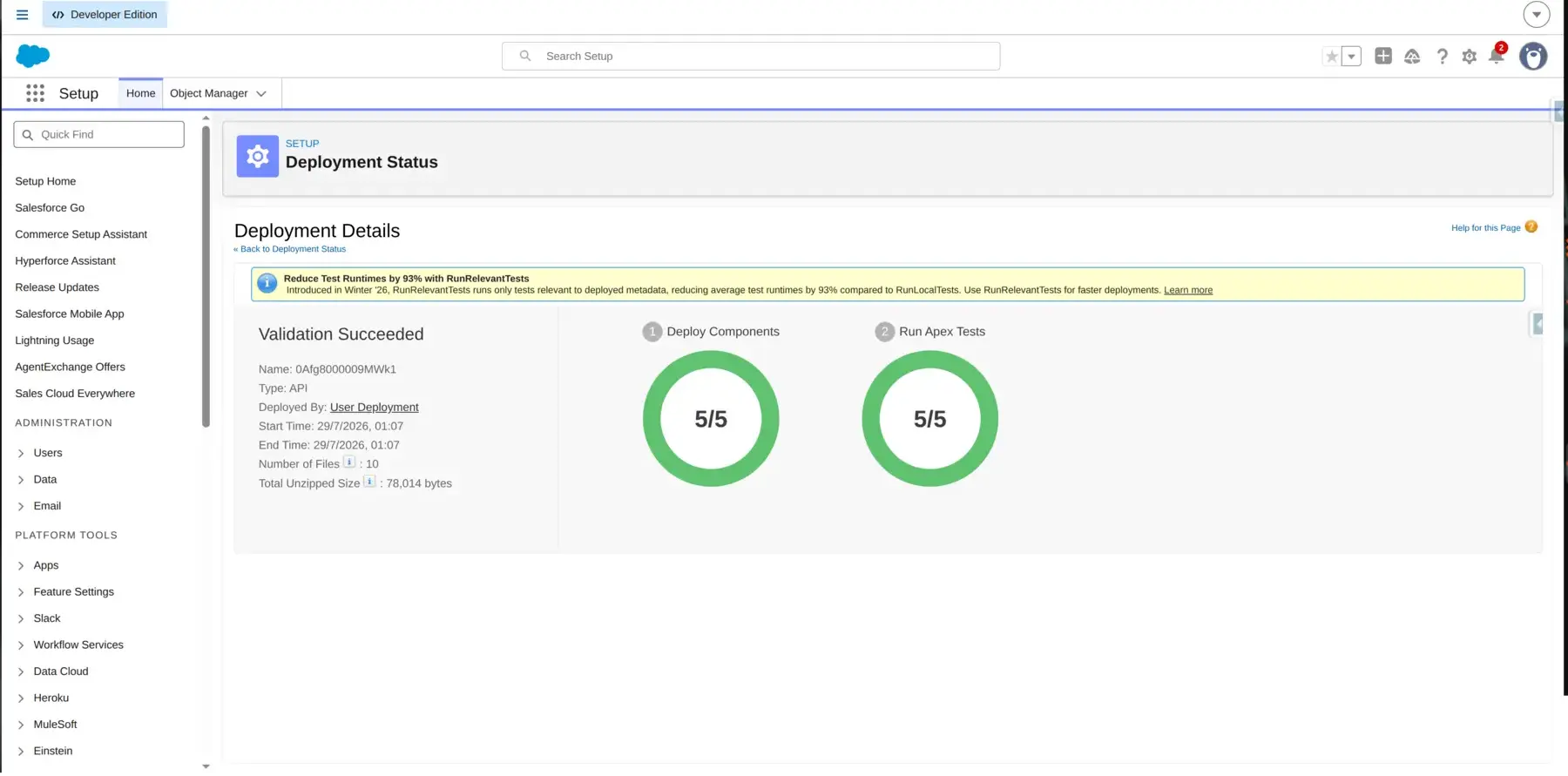
Only after the required checks pass should the reviewer approve and complete the PR. Use Squash commit or a normal merge commit. This pipeline expects the merged commit to have a parent (HEAD^1) so it can calculate the delta introduced by the merge.
13. Merge, revalidate and deploy
The merge pushes to dev. That push does not immediately trust the PR result: it generates the merged delta again, performs a second dry-run, and then deploys the same published artifact. This protects the branch from changes that may have landed between validation and merge.
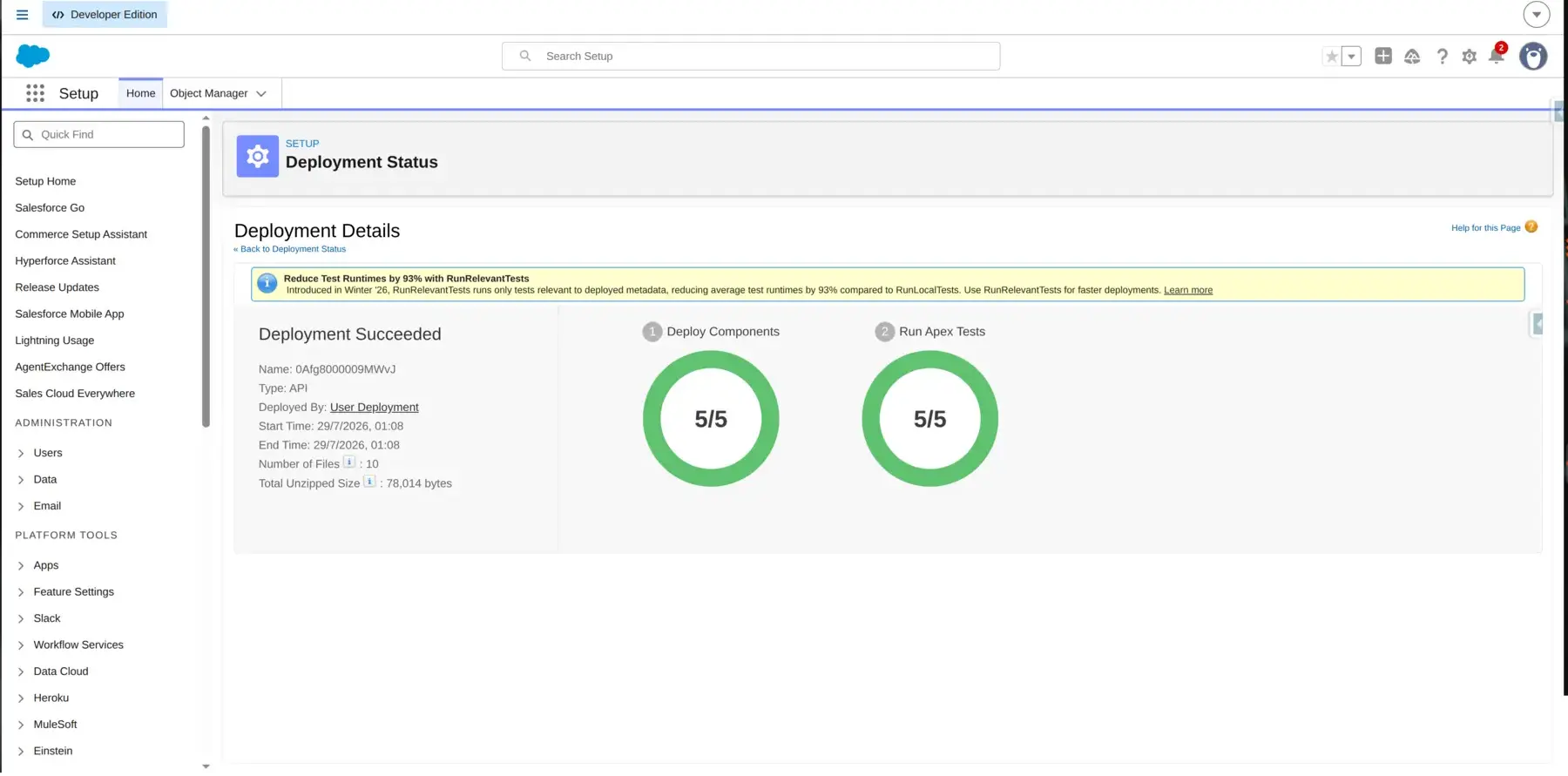
From here, promotion uses the same route at every level:
- Create a PR from
devtouat. The PR dry-run targets the UAT org. - After UAT testing and approval, merge it. Azure DevOps revalidates and deploys to UAT.
- Create a PR from
uattomain. The PR dry-run targets PROD. - After the production approval policy is satisfied, merge it. The pipeline revalidates and deploys the delta to PROD.
Troubleshooting checklist
- JWT login fails: verify that the Consumer Key, username, instance URL and private key all belong to the same environment; then confirm that the External Client App trusts the matching public certificate.
- PR pipeline targets the wrong org: check the PR target branch, not only its source branch. The target is what the YAML maps to DEV, UAT or PROD.
- No changes are deployed: inspect the delta artifact and confirm the metadata path is included in the
trigger.pathslist. - Tests fail in the pipeline: reproduce the test with the target org's configuration in mind. A test that accidentally relies on a local user, record or permission is not portable.
- Destructive changes behave unexpectedly: put dependency-breaking deletes in
manifest/destructiveChangesPre.xml; regular metadata removals are emitted by SFDX-Git-Delta as post-deploy destructive changes. - A manual run deploys unexpectedly: it should not. Keep the
Build.Reasonconditions that allow manual validation but exclude manual deployment.
Before you call it production-ready
- Require reviewers and successful Build Validation on every release branch.
- Use distinct JWT certificate pairs, Secure Files and variable groups per environment.
- Grant the deployment identity only the permissions it needs; do not default to a human administrator account.
- Keep the pipeline definition in Git and review it like application code.
- Pin tool versions and rotate certificates before they expire.
- Promote the same reviewed commit from DEV to UAT to PROD; never rebuild the feature by hand in a later environment.